Pages

Showing posts with label web. Show all posts

Thursday, May 21, 2015

Final Blog Post (for now)

Just a week ago my index page was pretty boring. It had a simple geometric background, and had no real color besides the 3 or 4 links that were various shades of blue, and a custom picture (that remains my favicon) that was a red-yellow gradient (favorite color is orange) and had a cool M made out of a line texture. Now, I think it looks really shiny. I have added a simple background texture I whipped up in a minute (unfortunately obvious) and a few color changes, along with a very cool picture from a pep assembly (courtesy of my awesome teacher, Mr. Olson) 


After the entire semester, I have to say my absolute favorite project was fairly recent; the "Layers" project, or "Family" as it is known on my website. I in general love doing projects that make me think about my family/friends and kind of describe them, just because its not really something you think of daily. It's also very cool because you can show off your work and show them that you included them in something for anyone to see.
 (There are 2 links above to the aforementioned site, or you can click here.)


This summer I will be working at the Blackbob Batting Cages and I will take a trip to Colorado Springs to visit my Grandmother and Great Aunt (among others) for the 4th of July. Otherwise, all of my time will be devoted to getting super good at Starcraft 2 and getting ahead of my father in GTA Online; and in general playing a whole lot of video games and almost only with friends.

My choice for next year is going to be Web Design. I find it easy and fun, and its a way to express myself creatively without worrying about staying inside the lines (as if it were a coloring picture) because I am the one creating the lines. Web design is also an easy way to show off your work because unlike animation, you don't have to deal with a blog, and you can just send people links directly to your websites. 

This is Mogran Stewrat signing off from 3rd hour Web Design as a Sophomore in eComm for the last time.

Saturday, April 11, 2015

Responsive Web Design Intro, Web

In order to prepare to make our websites responsive, we needed to learn HOW they are responsive. This is done mostly through media queries. Break points are important for the code, however. Break points are used to separate sections of code so it is easier to read and change, but  media queries are what we use to make websites responsive to the device, and they became a standard in 2012. They are a CSS3 module and basically tell a website when to shrink and grow.

The website I have chosen to show as having good responsive design is http://stephencaver.com/
This is because the website shows a good example of shortening content for mobile users, and also looks great on each screen.


 This is the full, desktop screen page. The motto is clearly defined with the logo in the top left, and there are buttons conveniently right below the text, with more links above the text as well.


When you shrink the website to a middle, tablet size, the buttons stack on top of each other, the logo moves to the center, and finally the motto shrinks a lot to give the specifics above room to grow. The buttons form 2 columns, and the font increases in size.


Finally, when you shrink the website to about a mobile device, the motto shrinks substantially and the buttons below completely disappear. The specifics become the buttons and remain above the motto, and the rest of the content comes up to replace the space of the buttons. There are no columns, and the font increases in size again. 

Wednesday, April 1, 2015

Website, Web

I now have a website published LIVE and ONLINE.
It's the full photo composition website that was on a earlier blogpost, now worked to be viewable on any device.
Go check it out! 
http://eravensonline.net/students/117mjs15/

Wednesday, March 25, 2015

Real or Hoax, Web Design

This is something that was supposed to be done a few months ago, and I ran out of time and just left this on my blog as a draft for the past few months. I have decided since I likely won't ever finish it I may as well publish it so you can see what I had done. So, y'know, while looking at this keep in mind it is NOT done and so probably won't look as good as everything else.

We spent time making a layout for this website, in order to give it a little more dynamic in comparison to past websites with the side bar and what not. The colors were up to us, and I am very happy with the colors that I picked for all of it.
Process
We started off with the layout as mentioned but the CSS itself and the design was up to us, I.E. whether or not to have the menu on the left or the right. I made a layout to copy off of and just renamed each page and changed the content to match what was needed.
Learning (yaay)
I learned that CSS is an amazing thing. No but really, we had so much CSS that it would have been a nightmare to make it for every single page and manage other things in the same code because it would have been super cluttered. But also, with CSS I learned that you can make codes more specific then others, for example I used #sidebar ul li a:hover just for the links in the sidebar, rather then having all links filed under a:hover, because then any links used would have the same format, and would thus look really out of place.


Mobile vs Desktop, Web Design

Today rather then showing off the stuff I make in e-Comm, I'm gonna talk about the trends of desktops users vs mobile users. On the onwravens.net website in particular, there are giant shifts in trends that have appeared after a few years. The data was collected from August 21 to March 12 each school year for the past 3 school years. Specifically, compared to the total amount of sessions the number of desktop sessions went from 79% in 2013 to 56% this year. Compareatively, the number of mobile users went from 14% to 35%. Tablets a little less so, going from 5% to 8%. It can be inferred that by the time next year rolls around, the number of users for desktop and PC will be very close or even the same. Mobile users are definitely on the rise though, that much can't be refuted.

A bounce rate for a website is when the user viewing the website leaves after the first page, without going to any links or anything.On the school website, over the past 3 years the bounce rate has slowly gone up, going from 46.87% in 2013 to 47.15% this year. Mobile devices haven't shown much of  a trend in relation to the bounce rate, but the desktop trend is very clear; 46.12% to 41.53%. Tablets too, have a clear trend, but in the opposite direction: 39.25% to 47.56%. The average session durations, as can be expected, lower each year for mobile users. Desktop and tablet users don't have a pattern in relation, but mobile users went from having an average session of 1 minute 45 seconds in 2013 to 1 minute 28 seconds this year. This very clearly shows that websites need to have more focus on having a fast loading website for their mobile users, and since mobile users are there for only a minute and tablet users tend to leave before you can really load anything cool, websites need to have the information to give to people as fast as possible. For instance, the pages people look for most should be very prominent. For instance, on the onwravens.net website people likely will look for directions, schedule, or contact information.


When comparing the USA's web trends to ours, I found that more americans use mobile services to browse the internet rather then with a desktop. According to my sources more people are buying mobile devices, less people are buying computers, and in general far more people are now using the internet on their mobile device then the computer. The school website shows almost the exact same trend, albeit a little less extreme.


In the end, responsive web design is becoming more important then ever with more and more people moving from desktop to mobile or getting mobile for the first time.


Sources: http://money.cnn.com/2014/02/28/technology/mobile/mobile-apps-internet/ , http://www.marketingcharts.com/online/in-the-us-time-spent-with-mobile-apps-now-exceeds-the-desktop-web-41153/ ,  http://www.census.gov/history/pdf/2013computeruse.pdf

Wednesday, March 4, 2015

Photo Composition Site, Web

This is still a work in progress (I think?) but I haven't posted anything in a while, so I thought I might go ahead and throw something on here.


Thursday, February 5, 2015

Mock Website, Web

A mock website made in Adobe Illustrator on one of my favorite video game factions. Soon to be a real website, maybe.

Monday, January 12, 2015

Trendy Lines, Web

For this project we followed a tutorial website for creating a similar project, although it required the use of a couple tools we don't have. I created a pattern using a square of colors, and then used it as a brush and painted diagonal lines across the artbourd of various size. Then I curved them around and made a few curvy lines of various sizes. Then I painted shadows underneath the overlapping lines to create the impression that it was 3D. We needed to use a tool we didn't have to make a texture over everything, so we had to find something close, but I think in the end I didn't pick the right brush and if anything I should've flat out skipped that step because it makes my picture seem a little crowded, and doesn't make sense.

Thursday, January 8, 2015

Project 1, Web

This wasn't actually supposed to be posted on the blog, but I thought it looked really cool so I posted it anyway. It was originally supposed to be blueprints-y but I wanted it to be a little more original. The name originates from a in-class joke that came from me putting 2 typos in my name back to back. I have 2 eComm classes, in one I accidentally typed Mogran Stewart and in the next class I typed Morgan Stewrat. With the encouragement from a few friends my name became Mogran Stewrat in eComm.

Monday, October 6, 2014

Bio/Project 8, Web Design


This is what we've worked on for about the past month. We've done a lot of learning for this, and I am actually very proud of what I've made. We learned first about CARP, the 4 rules of all graphics. Contrast, Alignment, Repition, and Proximity. With this you can easily make a really good graphic. We learned about the "<div>" tag, which is used to separate different parts of your website. In order to make the styles uniform, we learned about CSS files, which tell a website how it should look, and how to make one. There are actually 3 types of incorporating CSS into a website; built into a div, built into the top of the website, or a separate file. We've mostly used the top, but this time we used a separate file.

For the picture, we all went out to the hallway to get our pictures taken. We then color corrected and cut out the photo. This is the picture I used.


We also used a background tiling image, where we took a picture of concrete and used various tools to make it seamless. We also used some color correction tools to blur it out as to not take attention away from the actual content of the page. This is the picture I made.


I didn't really run into any issues, other then missing a few class periods due to band. I also had some technical problems which I needed help with. Next time I will make the CSS file use better colors, because I don't think that the font colors I picked are very pretty or appealing.

Wednesday, September 3, 2014

Project 4, Web Design

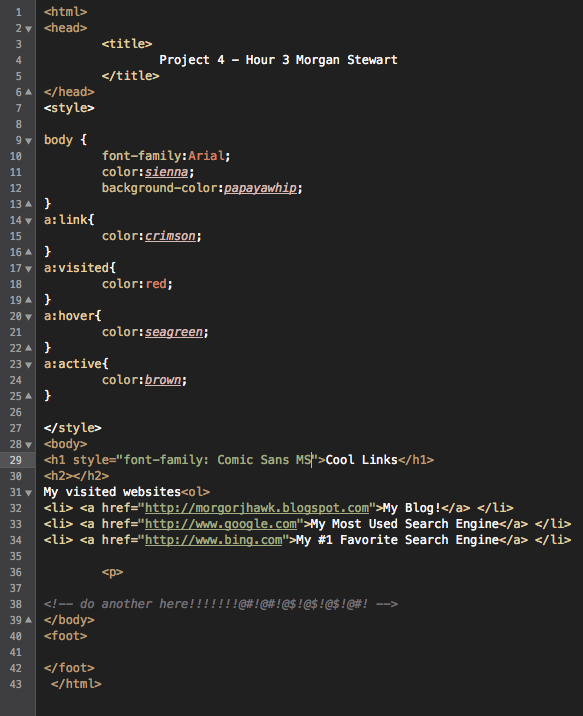
So while we can't actually upload any websites or anything like that yet, I still want to show off what I'm doing in web design because I think it looks cool. The top picture is the HTML code (hand-typed) and the bottom picture is the product thus far.

Tuesday, August 26, 2014

Color Wheel, Web Design

This is my first Web Design project. Before we actually started doing web site stuff, we made a color wheel because color use and color variation is EXTREMELY important for making your website unlike the other websites out there.